¿Cómo almacenan las aplicaciones datos en las copias de seguridad de iPhone: nombres de archivo y hashes?

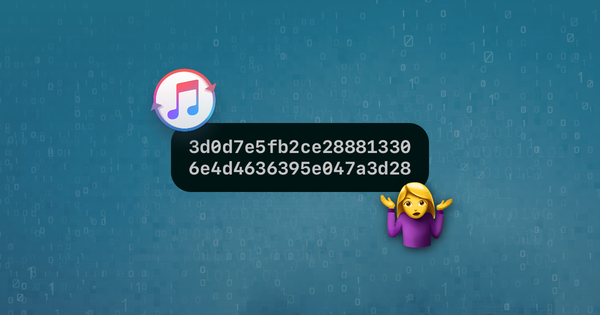
Este artículo lo ayudará a encontrar archivos pertenecientes a una aplicación en particular dentro de una copia de seguridad de iPhone. También lo ayudará a comprender mejor cómo se organizan los archivos y carpetas en iOS.
El enfoque más simple para recuperar archivos de una copia de seguridad de iOS es usar iPhone Backup Extractor: la edición gratuita lo ayudará a encontrar y extraer los archivos que necesita, ya que puede hacerlo sin necesidad de conocer los detalles en este artículo. Si desea hacer eso, encontrará que tenemos una serie de guías útiles que se muestran en el menú superior de este sitio, que lo guiarán a través de ese proceso.
Comprender los nombres de archivos con hash en las copias de seguridad de iOS
Cuando se realiza una copia de seguridad de iTunes o iCloud para su iPhone, iPad o iPod Touch, los datos importantes se guardan en varios archivos dentro de la carpeta de copia de seguridad.
Los nombres de archivo están codificados para que aparezcan como cadenas de letras y números si accede a la carpeta de respaldo, usando lo que se conoce como hash SHA-1 codificado en hexadecimal. En muchas versiones del sistema operativo iPhone se utilizan los mismos nombres.
Estos son algunos de los archivos principales de la base de datos SQLite que se encuentran en la carpeta de respaldo de iTunes . Los nombres de los archivos son los mismos para las copias de seguridad de iTunes e iCloud.
Ubicaciones de archivos de copia de seguridad de iPhone iOS 16, 15 y 14
| Contenido | Nombre de archivo real | Nombre de archivo de copia de seguridad |
|---|---|---|
| SMS | sms.db | 3d0d7e5fb2ce288813306e4d4636395e047a3d28 |
| Contactos | AddressBook.sqlitedb | 31bb7ba8914766d4ba40d6dfb6113c8b614be442 |
| Calendario | Calendar.sqlitedb | 2041457d5fe04d39d0ab481178355df6781e6858 |
| Recordatorios | Calendar.sqlitedb | 2041457d5fe04d39d0ab481178355df6781e6858 |
| Notas | notes.sqlite | ca3bc056d4da0bbf88b5fb3be254f3b7147e639c |
| Notas | NoteStore.sqlite | 4f98687d8ab0d6d1a371110e6b7300f6e465bef2 |
| Historial de llamadas | call_history.db | 2b2b0084a1bc3a5ac8c27afdf14afb42c61a19ca |
| Historial de llamadas | CallHistory.storedata | 5a4935c78a5255723f707230a451d79c540d2741 |
| Ubicaciones | consolidated.db | 4096c9ec676f2847dc283405900e284a7c815836 |
| Historial web | History.db | 1a0e7afc19d307da602ccdcece51af33afe92c53 |
| Mensaje de voz | voicemail.db | 992df473bbb9e132f4b3b6e4d33f72171e97bc7a |
| Fotos | Photos.sqlite | 12b144c0bd44f2b3dffd9186d3f9c05b917cee25 |
| Fondo de pantalla (pantalla de inicio) | HomeBackground.cpbitmap | b97b0c3bc8a6bb221d0849b450fbd92b5d06a301 |
| Fondo de pantalla (pantalla de bloqueo) | LockBackground.cpbitmap | 86736007d0166a18c646c567279b75093fc066fe |
Ubicaciones de archivos de respaldo de iPhone iOS 13, 12 y 11
| Contenido | Nombre de archivo real | Nombre de archivo de copia de seguridad |
|---|---|---|
| SMS | sms.db | 3d0d7e5fb2ce288813306e4d4636395e047a3d28 |
| Contactos | AddressBook.sqlitedb | 31bb7ba8914766d4ba40d6dfb6113c8b614be442 |
| Calendario | Calendar.sqlitedb | 2041457d5fe04d39d0ab481178355df6781e6858 |
| Recordatorios | Calendar.sqlitedb | 2041457d5fe04d39d0ab481178355df6781e6858 |
| Notas | notes.sqlite | ca3bc056d4da0bbf88b5fb3be254f3b7147e639c |
| Notas | NoteStore.sqlite | 4f98687d8ab0d6d1a371110e6b7300f6e465bef2 |
| Historial de llamadas | call_history.db | 2b2b0084a1bc3a5ac8c27afdf14afb42c61a19ca |
| Historial de llamadas | CallHistory.storedata | 5a4935c78a5255723f707230a451d79c540d2741 |
| Ubicaciones | consolidated.db | 4096c9ec676f2847dc283405900e284a7c815836 |
| Historial web | History.db | e74113c185fd8297e140cfcf9c99436c5cc06b57 |
| Mensaje de voz | voicemail.db | 992df473bbb9e132f4b3b6e4d33f72171e97bc7a |
| Fotos | Photos.sqlite | 12b144c0bd44f2b3dffd9186d3f9c05b917cee25 |
| Fondo de pantalla (pantalla de inicio) | HomeBackground.cpbitmap | b97b0c3bc8a6bb221d0849b450fbd92b5d06a301 |
| Fondo de pantalla (pantalla de bloqueo) | LockBackground.cpbitmap | 86736007d0166a18c646c567279b75093fc066fe |
Ubicaciones de archivos de copia de seguridad de iPhone iOS 10, 9, 8 y 7
| Contenido | Nombre de archivo real | Nombre de archivo de copia de seguridad |
|---|---|---|
| SMS | sms.db | 3d0d7e5fb2ce288813306e4d4636395e047a3d28 |
| Contactos | AddressBook.sqlitedb | 31bb7ba8914766d4ba40d6dfb6113c8b614be442 |
| Calendario | Calendar.sqlitedb | 2041457d5fe04d39d0ab481178355df6781e6858 |
| Recordatorios | Calendar.sqlitedb | 2041457d5fe04d39d0ab481178355df6781e6858 |
| Notas | notes.sqlite | ca3bc056d4da0bbf88b5fb3be254f3b7147e639c |
| Historial de llamadas | call_history.db | 2b2b0084a1bc3a5ac8c27afdf14afb42c61a19ca |
| Historial de llamadas | CallHistory.storedata | 5a4935c78a5255723f707230a451d79c540d2741 |
| Ubicaciones | consolidated.db | 4096c9ec676f2847dc283405900e284a7c815836 |
| Fotos | Line.sqlite | 2d711a1f5613f5259730b98328a3f7e816698f88 |
Las rutas a las bases de datos de WhatsApp, Snapchat, Kik, Viber y WeChat se mencionan en la siguiente tabla. Estos nombres de archivo están disponibles para iOS 8 y 9, pero tienen nombres diferentes para las versiones anteriores de iOS.
| Aplicación de chat | Almacenado en | Nombre de archivo de respaldo |
|---|---|---|
App Domain/net.whatsapp.WhatsApp/ , Documents/ChatStorage.sqlite | 1b6b187a1b60b9ae8b720c79e2c67f472bab09c0 , 275ee4a160b7a7d60825a46b0d3ff0dcdb2fbc9d , 7c7fba66680ef796b916b067077cc246adacf01d | |
| Snapchat | App Domains/com.toyopagroup.picaboo/ , Documents/chats.plist (mensajes privados) o stories.plist ( stories.plist públicas) | 1cd3cd2b412f7b045dd479b617cb2a4f99ffdfee , 7cdb9af6c5352b97cc0f87369df43c49a45c99f3 |
| Kik | App Domain/group.com.kik.chat/ , cores/private/…/kik.sqlite | 8e281be6657d4523710d96341b6f86ba89b56df7 |
| Viber | App Domain/com.viber/ , Documents/Contacts.data | b39bac0d347adfaf172527f97c3a5fa3df726a3a |
App Domain/com.tencent.xin/ , Documents/DB/MM.sqlite | (Varía dinámicamente) | |
| Línea | Photos.sqlite | 12b144c0bd44f2b3dffd9186d3f9c05b917cee25 |
Nombres de archivo de copia de seguridad de iPhone iOS 6
| Contenido | Nombre de archivo real | Nombre de archivo de copia de seguridad |
|---|---|---|
| SMS | sms.db | 3d0d7e5fb2ce288813306e4d4636395e047a3d28 |
| Contactos | AddressBook.sqlitedb | 31bb7ba8914766d4ba40d6dfb6113c8b614be442 |
| Calendario | Calendar.sqlitedb | 2041457d5fe04d39d0ab481178355df6781e6858 |
| Recordatorios | Calendar.sqlitedb | 2041457d5fe04d39d0ab481178355df6781e6858 |
| Notas | notes.sqlite | ca3bc056d4da0bbf88b5fb3be254f3b7147e639c |
| Historial de llamadas | call_history.db | 2b2b0084a1bc3a5ac8c27afdf14afb42c61a19ca |
| Ubicaciones | consolidated.db | Eliminado de la copia de seguridad de iTunes, no de iOS |
Nombres de archivo de copia de seguridad de iPhone iOS 5
| Contenido | Nombre de archivo real | Nombre de archivo de copia de seguridad |
|---|---|---|
| SMS | sms.db | 3d0d7e5fb2ce288813306e4d4636395e047a3d28 |
| Contactos | AddressBook.sqlitedb | 31bb7ba8914766d4ba40d6dfb6113c8b614be442 |
| Calendario | Calendar.sqlitedb | 2041457d5fe04d39d0ab481178355df6781e6858 |
| Recordatorios | Calendar.sqlitedb | 2041457d5fe04d39d0ab481178355df6781e6858 |
| Notas | notes.sqlite | ca3bc056d4da0bbf88b5fb3be254f3b7147e639c |
| Historial de llamadas | call_history.db | 2b2b0084a1bc3a5ac8c27afdf14afb42c61a19ca |
| Ubicaciones | consolidated.db | Eliminado de la copia de seguridad de iTunes, no de iOS |
Nombres de archivo de copias de seguridad de iPhone iOS 4
| Contenido | Nombre de archivo real | Nombre de archivo de copia de seguridad |
|---|---|---|
| SMS | sms.db | 3d0d7e5fb2ce288813306e4d4636395e047a3d28 |
| Contactos | AddressBook.sqlitedb | 31bb7ba8914766d4ba40d6dfb6113c8b614be442 |
| Calendario | Calendar.sqlitedb | 2041457d5fe04d39d0ab481178355df6781e6858 |
| Notas | notes.sqlite | ca3bc056d4da0bbf88b5fb3be254f3b7147e639c |
| Historial de llamadas | call_history.db | 2b2b0084a1bc3a5ac8c27afdf14afb42c61a19ca |
| Ubicaciones | consolidated.db | 4096c9ec676f2847dc283405900e284a7c815836 |
Nombres de archivo de copia de seguridad de iOS 3 y 2 iPhone
| Contenido | Nombre de archivo real | Nombre de archivo de copia de seguridad |
|---|---|---|
| SMS | sms.db | 3d0d7e5fb2ce288813306e4d4636395e047a3d28 |
| Contactos | AddressBook.sqlitedb | 31bb7ba8914766d4ba40d6dfb6113c8b614be442 |
| Calendario | Calendar.sqlitedb | 2041457d5fe04d39d0ab481178355df6781e6858 |
| Notas | notes.db | 740b7eaf93d6ea5d305e88bb349c8e9643f48c3b |
| Historial de llamadas | call_history.db | ff1324e6b949111b2fb449ecddb50c89c3699a78 |
Nombres de archivo de copia de seguridad de iPhone iOS 1
| Contenido | Nombre de archivo real | Nombre de archivo de copia de seguridad |
|---|---|---|
| SMS | sms.db | 3d0d7e5fb2ce288813306e4d4636395e047a3d28 |
| Contactos | AddressBook.sqlitedb | adb8c77534444e97c31ff15924d50f3ed1fbd3b1 |
| Calendario | Calendar.sqlitedb | 14ee8cdc3e6e0220399ff210246e1c92b7df89a0 |
| Notas | notes.db | 740b7eaf93d6ea5d305e88bb349c8e9643f48c3b |
| Historial de llamadas | call_history.db | a49bfab36504be1bf563c1d1813b05efd6076717 |
Como ha visto, es bastante difícil trabajar con archivos con este nombre. Si desea una forma más fácil de saber qué hay en su copia de seguridad de iTunes o iCloud, le proporcionamos una herramienta que hace toda esta decodificación por usted. Eche un vistazo a iPhone Backup Extractor .
Comprender el modo experto y los dominios de iOS
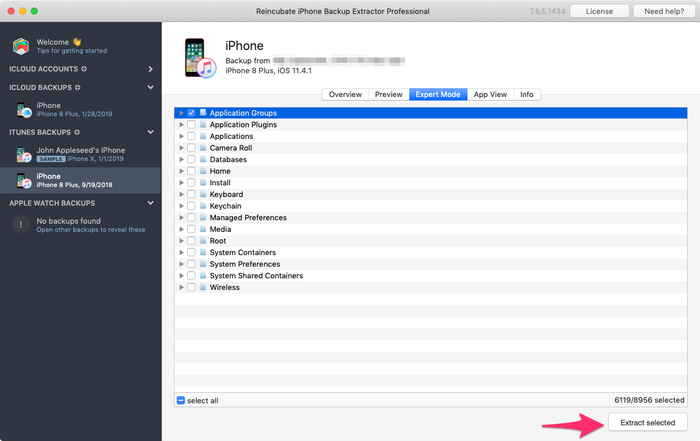
Al crear aplicaciones para iOS, los autores deben tomar una serie de decisiones sobre cómo y dónde almacenan los datos. (Hemos escrito por separado sobre las compensaciones que enfrentan los autores de aplicaciones al decidir dónde almacenar los datos del usuario ). La mejor manera de explorar y familiarizarse con el lugar donde cada aplicación almacena sus archivos en iOS es usar la edición gratuita de iPhone Backup Extractor. Si lo carga, seleccione una copia de seguridad en el menú de navegación de la izquierda y luego elija "Modo experto" en la parte principal de la pantalla, se le presentará una lista de alrededor de 18 carpetas, probablemente comenzando con "Aplicación Grupos ”. Estrictamente hablando, estas agrupaciones de nivel superior se conocen como "Dominios".
Muchos dominios solo se utilizan de forma tangencial por parte de las aplicaciones. Por ejemplo, el dominio "Teclado" puede tener algunos datos de teclados de terceros, pero no de aplicaciones normales.
Algunos dominios, como “Medios” y “Rollo de cámara”, son muy utilizados por las aplicaciones integradas de Mensajes y Cámara. Sin embargo, son los dominios de "Grupos de aplicaciones" y "Aplicaciones" los que más nos interesan cuando buscamos datos de aplicaciones de terceros.
¿Qué hay en un espacio de nombres?
Si expande el dominio "Aplicaciones" para enumerar las carpetas que contiene, verá varias carpetas con nombres extraños. He aquí un ejemplo:
com.apple.Health-
com.burbn.instagram -
com.facebook.Messenger -
snapchat.picaboo -
com.spotify.client
Estas carpetas son el lugar principal para que una aplicación almacene sus datos y, por lo general, se denominan con el mismo formato. En 1996, Sun Microsystems publicó un lenguaje de programación llamado Java. La documentación de Java estableció una forma para que los editores de software de terceros publiquen su software sin que entre en conflicto con el software de otros autores. El truco consistía en tomar el nombre del sitio de la empresa, como apple.com, y revertirlo antes de agregar el nombre del producto. Por lo tanto, la aplicación Health de Apple pertenece a com.apple.Health , y iPhone Backup Extractor pertenece con razón a com.reincubate.iPhoneBackupExtractor . Estos nombres se conocieron como "espacios de nombres" y Sun publicó una serie de reglas adicionales para ellos .
Apple adoptó esto como una mejor práctica al diseñar iOS. Por supuesto, el estándar de nomenclatura es solo una guía. Como puede ver en el ejemplo de Snapchat ( snapchat.picaboo ), no todos juegan con las mismas reglas. Esto no es necesariamente algo malo, pero la coherencia puede ser útil cuando uno está tratando de recuperar datos.
En algunos casos, el espacio de nombres de una aplicación puede revelar una peculiaridad histórica interesante. El espacio de nombres de Instagram es com.burbn.instagram porque, bueno ... en 2010, Instagram se conocía como Burbn .
¿Dónde almacenan sus datos las aplicaciones populares de iOS?
La siguiente tabla muestra los espacios de nombres para varias aplicaciones populares de iOS. No lo olvide, iPhone Backup Extractor tiene esta lista incorporada (y conoce los cambios entre las diferentes versiones de las aplicaciones y de iOS), por lo que siempre sabe dónde buscar cuando lo ayuda a recuperar datos de iOS.
| Aplicación | espacio de nombres de iOS |
|---|---|
com.facebook.Facebook , com.facebook.Messenger | |
com.burbn.instagram | |
| Snapchat | snapchat.picaboo |
| Mensajes | Home/Library/SMS |
| Spotify | com.spotify.client |
pinterest | |
| Skype | com.skype.skype |
| Shazam | com.shazam.Shazam |
¿Cómo almacenan sus datos las aplicaciones de iOS y cómo se pueden leer?
Los autores de aplicaciones son libres de almacenar datos en el formato que deseen en sus aplicaciones. Los usuarios de iPhone Backup Extractor tenderán a ejecutar tres formatos si buscan datos manualmente en sus copias de seguridad:
- XML Plists
- Plistas binarios
- Bases de datos SQLite
Tanto XML como Plists binarios se identifican a menudo con la extensión de archivo ".plist". Sin embargo, muchas otras extensiones también pueden indicar que un archivo es una Plist, como ".cookies". Plist es una abreviatura de "Lista de propiedades" y son el formato de archivo preferido de Apple para almacenar una colección de datos simples . Los plists XML generalmente se pueden leer a simple vista, ya que se almacenan en texto plano, pero los plists binarios normalmente no son comprensibles si se ven claramente.
Afortunadamente, la edición gratuita de iPhone Backup Extractor tiene un visor y editor de Plist incorporado: elija "Ver / Editar Plist" en el menú Archivo y podrá examinar el contenido de cualquier archivo Plist. Alternativamente, en el modo Experto, los usuarios pueden hacer clic derecho en un archivo y elegir "Ver como Plist".
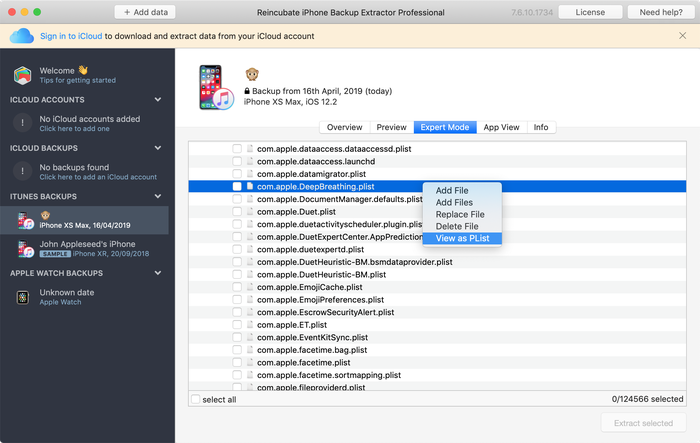
Las bases de datos SQLite son lo que podría esperar: colecciones de datos estructurados. A menudo se indican con extensiones de archivo “.db” o “.sqlite3”. Estos archivos no se pueden leer sin un editor especial, pero iPhone Backup Extractor tiene la tecnología para consultarlos por usted.
¿Qué contiene cada dominio en una copia de seguridad de iPhone?
| dominio de respaldo de iOS | Datos encontrados en este dominio |
|---|---|
| Grupos de aplicaciones | Los datos almacenados aquí por las aplicaciones se pueden compartir un poco más libremente en el dispositivo. Muchas aplicaciones almacenarán una pequeña cantidad de datos aquí, pero rara vez verá contenido valioso. |
| Complementos de aplicaciones | Las aplicaciones que almacenan datos aquí suelen hacerlo como parte de una extensión de iOS. Puede ser como un complemento de Watch, un teclado de terceros, un widget, una extensión para compartir o un Animoji. Este dominio rara vez contiene datos de usuario. |
| Aplicaciones | Este es el dominio principal para que las aplicaciones almacenen datos de usuario en un iPhone. Cada aplicación tiene su propio espacio de nombres, como se describe en la sección "¿Qué hay en un espacio de nombres?" sección anterior. |
| Rollo de la cámara | El dominio de rollo de cámara incluye todas las fotos, videos y metadatos almacenados en un dispositivo iOS. Si el dispositivo está configurado para "Optimizar almacenamiento" y no para almacenar todas las fotos localmente, este dominio puede contener menos información de la que se espera. |
| Bases de datos | Aquí se almacena poca información sobre las instalaciones modernas de iOS. |
| Salud | HealthKit y los datos médicos se almacenan en el dominio Health, junto con los datos de actividad que se comparten con un Apple Watch emparejado. |
| Hogar | El dominio Home es una mina de oro de información para muchas de las aplicaciones integradas de Apple, como Mensajes, Notas y Calendario. |
| HomeKit | Este dominio almacena una cantidad limitada de información sobre el estado de la configuración de Apple HomeKit. |
| Instalar en pc | El dominio de instalación contiene metadatos para indicar qué aplicaciones de Apple integradas están instaladas en el dispositivo iOS. |
| Teclado | La configuración de idioma y teclado se almacena en este dominio. |
| Llavero | El llavero del dispositivo iOS (una colección de contraseñas de usuario) se almacena aquí, en un archivo SQLite. |
| Preferencias administradas | Este dominio contiene datos sobre la gestión del dispositivo iOS. Si su dispositivo está inscrito en un programa MDM (administración de dispositivos móviles), tal vez por su escuela o empleador, algunos metadatos se almacenarán aquí. |
| Medios de comunicación | Muchos tipos de medios se almacenan bajo este dominio. Por ejemplo, los usuarios encontrarán aquí archivos adjuntos a mensajes SMS, grabaciones y datos de PhotoStream. |
| Raíz | Los dominios raíz contienen archivos de configuración fundamentales para la configuración del dispositivo iOS. |
| Contenedores del sistema | El dominio de contenedores del sistema contiene metadatos limitados de la aplicación App Store y algunos otros procesos de iOS. |
| Preferencias del Sistema | Este dominio contiene información de bajo nivel sobre el estado de un dispositivo iOS. Por ejemplo, puede aprender sobre su configuración de red o sobre las redes wi-fi o VPN a las que se ha conectado recientemente. |
| Contenedores compartidos del sistema | Algunos procesos del sistema iOS que pueden compartir datos en iOS almacenan sus datos aquí. Es un buen lugar para comenzar cuando busca obtener más información sobre la actividad de Bluetooth en un dispositivo, por ejemplo. |
| Inalámbrico | El dominio inalámbrico contiene un rico conjunto de información sobre el uso de iOS de redes celulares y wi-fi, y de sus recientes asignaciones de direcciones IP. |
Que hacer a continuación
¿Por qué no descargar iPhone Backup Extractor o leer más sobre Reincubate y cómo ayudamos a los clientes de todo el mundo a recuperar sus datos?
Si desea obtener más información sobre iOS o iPhone Backup Extractor, este sitio tiene un amplio conjunto de guías y artículos sobre cómo aprovechar al máximo sus datos. Un buen lugar para comenzar podría ser nuestro artículo sobre qué se almacena y qué no se almacena en una copia de seguridad . Nuestro centro de soporte contiene una serie de piezas de base de conocimientos adicionales con respuestas a preguntas frecuentes.



por GWON
Hello. I don't think this is suited for your article, but I feel like you can help with the problem I'm facing, so I contact you.
I tried several times to restore from an iPhone backup, but it kept getting the error and I gave up. So I just want to put the photo back on the iPhone.
I tried transfer photos through programs like iMazing, iExplorer, and Dr.fone, but I always ran into the problem of the reverse order of photos in the camera roll.
I know that photos are sorted according to metadata in Photos app's library, but what I want to do is fix the problem of sorting in reverse order in the camera roll, not the library.
The way I tried is as follows :
But the problem is that the order of the photos is reversed.
For example, if I have photo files like this:
[100APPLE] = {IMG_0001, IMG_0002, ..., IMG_0999}
...
[109APPLE] = {IMG_9001, IMG_0002, ..., IMG_9999}
(These photos were taken with the iPhone, and the file name order and time order matches, and this means that the IMG_0001 photo is the oldest photo and the IMG_9999 photo is the most recent one.)
As usual, there should be an IMG_0001 at the top and the first part of the camera roll, and an IMG_9999 at the bottom end.
But it is the opposite. For the photos transferred, IMG_9999 at the top and IMG_0001 at the bottom.
So what I want is that when I transfer photos to my iPhone, I see them from top to bottom in chronological order or filename in the camera roll.
If you knows a solution, please help me.
Best regards.
responder por: Reincubate Support
Great question! We can help with this — we'll drop you an email shortly. 🙂
por Aurora
Thanks! It is absolutely great...
por Eric Stam
Good morning,
Could you please help me out with the following: the WhatsApp backup file
275ee4a160b7a7d60825a46b0d3ff0dcdb2fbc9ddoes not exist in the backup file (C:/user/user/appdata/roaming/apple computer/mobile sync//backup (Apple IOS 10).Have the backup file names changed? Please help me locating these files for IOS 10. Highly appreciated, kind regards,
Eric Stam
responder por: Reincubate Support
Hi Eric, thanks for asking! Yes, the names do change between backup versions. The easiest approach is to use the free edition of iPhone Backup Extractor: it'll let you pull out the file you need without having to look up the code. 🕵️♀️
por Yngve Moe
iOS 10 backup: Manifest.db is an SQLite database, with a "Files" table containing all the cryptic backup file names with their corresponding actual file names and paths.
responder por: Reincubate Support
That's right. But not if it's an encrypted backup, which it should be for your safety!
por Kokil Chauhan
Hi Andrew, the information you have shared with us is very productive, Thanks :) Can you please help me out about the file name for messenger in iPhone backup? I really appreciate your response.
responder por: Reincubate Support
Hi Kokil, thanks for your kind words! Facebook Messenger scatters its data over a whole series of files, and many of them have hashes in their names that'll very from phone to phone. You're best off looking in iPhone Backup Extractor's expert mode. The folder you'll be after is
/Applications/com.facebook.Messenger. Happy hunting!por LicSKY
Hello,
Where are the mail settings, user and password saved?
Where is the safari password list stored?
Same for facebook?
Thank you in advance for your prompt feedback
responder por: Reincubate Support
Hi LicSKY, thanks for asking! I sense you're looking for passwords. Whilst mail settings are stored in backups the password for your email and Facebook won't be included there.
That Safari password list is included in your "key bag", and that can be found in
/Keychain/TrustStore.sqlite3.por alex
Please I will be needing help from you. I just got this Iphone 5 and trying to activate it was told it has being activated with another person's account. what can I do to remove the person's account I tried everything I could please
responder por: Reincubate Support
Hi Alex, this is Apple's iCloud activation lock. It's an important feature that prevents trafficking of stolen phones. The only way for that lock to be removed is it the person who signed in to the phone either signs out of the phone, or removes it from their iCloud account. Alternately, if you can take a receipt showing proof of purchase to an Apple Store, they can remove the lock for you.
If someone has sold you a phone that's already locked, it's practically worthless: you may want to ask for your money back!
por Karbofox
Thx it was useful. It helped me a lot!