Where are iPad and iPhone backups stored on PC or Mac?

If you accidentally deleted some information from an iOS device and hope to recover it, an iTunes backup can be a great help.
iTunes backups happen automatically, each time you connect your iPad or iPhone with iTunes (if you didn’t turn on the iCloud Backup option), or manually, when you right-click the device in iTunes and choose ‘’Back Up’’. They are saved on your computer and contain important data, such as contacts, text messages, calendar, notes, call history and app data.
So where are iPhone or iPad backups stored? It depends on which operating system your computer is using, although the default backup location is the same between iOS versions.
Where is the iTunes backup folder on Windows?
iTunes backups are stored in %APPDATA%\Apple Computer\MobileSync on Windows.
On Windows 10, 8, 7 or Vista, this'll be a path like \Users\[USERNAME]\AppData\Roaming\Apple Computer\MobileSync\Backup.
With Windows XP that'd be similar to \Documents and Settings\[USERNAME]\Application Data\Apple Computer\MobileSync\Backup.
The Microsoft Store version of iTunes is a little different: it stores its backups under %HOMEPATH%\Apple\MobileSync. That'll be a path like \Users\[USERNAME]\Apple\MobileSync\Backup.
Where is the iTunes backup folder on macOS / OS X?
iTunes backups are stored in ~/Library/Application Support/MobileSync on macOS.
That folder is typically at /Users/[USERNAME]/Library/Application Support/MobileSync/Backup.
In macOS 10.15, Finder creates iPhone backups, instead of iTunes. However, these backups are stored in the same location.
How to find the iTunes backup folder automatically
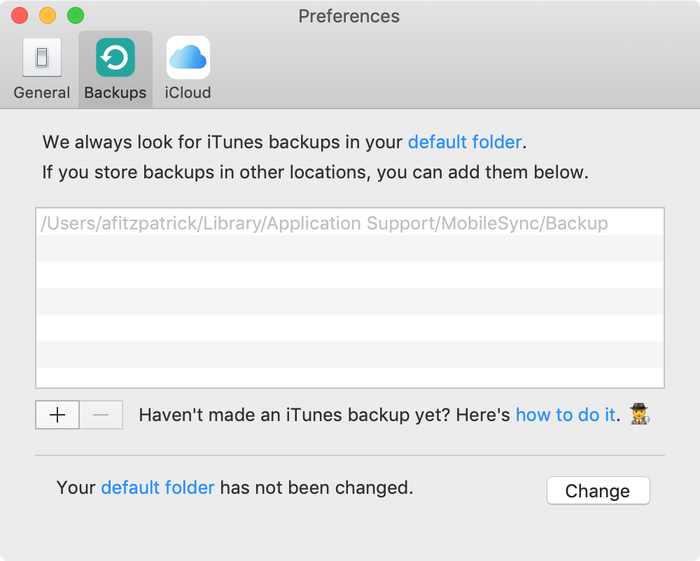
iPhone Backup Extractor automatically finds the iTunes backup folder for you, and can open it with a click. This functionality is in the free version, so this won't cost a thing.
- Download and install iPhone Backup Extractor
- Open the
Preferenceswindow from the app's pull-down menu - Select the
Backupstab. - Where the window says "We always look for backups in your default folder", click the "default folder" link. Easy!
Opening the iTunes backup folder on Windows
Open the default Backup location in Explorer using the Windows Run command. Press ⊞ Win + R and the Run window should appear. Enter %APPDATA%\Apple Computer\MobileSync and press ⏎ Enter.
For the Microsoft Store version of iTunes, you could do this: Press ⊞ Win + R and the Run window should appear. Enter %HOMEPATH%\Apple\MobileSync and press ⏎ Enter.
Here's what this looks like on Windows 10:
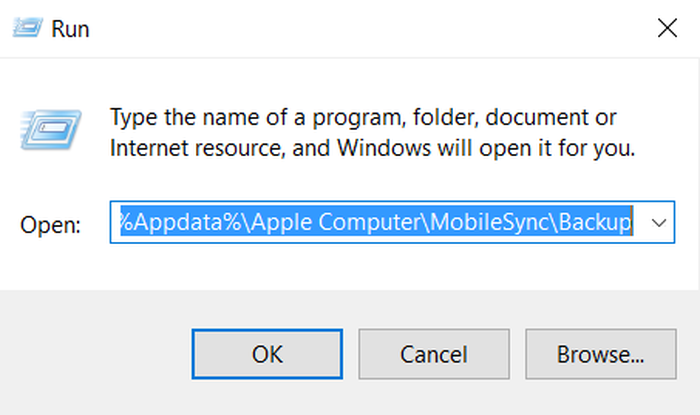
The Explorer window that opens will show a folder named "Backup". This contains any iTunes backups which are already present on the computer.
Finding the iTunes backup folder on macOS
The default backup location can be shown in Finder using Spotlight. Pressing ⌘ Cmd + and type ~/Library/Application Support/MobileSync before pressing ⏎ Enter.
The Finder window that opens will show a folder named "Backup". This contains any iTunes backups which are already present on the computer.
Changing the iTunes backup folder location?
If you'd like to change the folder that iTunes backups up to by default, we have a handy guide in our support centre.



by Sohaib Ahmed
Thanks alot.
Cheers.. .. .!!!
by Jake Lown
Hi, I would like to restore a previous backup but I'm having trouble finding out my backup password. Can you please help me with this?
reply by: Reincubate Support
Hey Jake, we've got a guide on password recovery. You can find it here.
by Gerry Wood
Many thanks for enabling me to find the backup file for my iphone on my PC. When I click on the properties of the backup file it shows that I have 2.23gb backed up in 3503 files which is reassuring.
If I now wish to view the contacts that have been backed up or restore them to a different device how do I do that if I've replaced my iphone with an android phone?
reply by: Reincubate Support
Hi Gerry, thanks for asking. We're glad the article was helpful. If you install iPhone Backup Extractor, you'll see the free edition lets you browse through all of your contacts. Try that — it can export your contacts into a
VCFformat that your Android will easily be able to import.by Apple Repair New Orleans
I plan to buy an iPhone 6S Plus from a client, but they want me to transfer all their data to their old 5C. I backed it up in iTunes, then plugged in the 5C, but the 6s backup is nowhere to be seen from the drop down list!
The 5C is 32GB and the 6S Plus is only 16GB, so I don't know what the problem is. Any ideas?
reply by: Reincubate Support
Hi guys, thanks for commenting. This one's an old chestnut: it's caused by one of the phones running a different version of iOS to the backup. Upgrade one or other so that they're running the same version, then update the backup. That'll sort it out!
by Justin
First of all; Thanks for the easy and helpful steps to get this far in the process. I am just curious as I am copying my backup off of my pc if it just as simple as me copying this backup off of my (non internet accessible) pc onto a hard drive, then I can drag and drop into the list of backups on the new Mac. I am trying to restore my old backup onto my new iPhone six, but my pc has lost ability to connect to the Internet, so I can't download the new iTunes update to be able to work with my iPhone six.
reply by: Reincubate Support
Justin! Thanks for writing. Yes, it really is that easy. You can move iTunes backup folders between Macs, or even between Macs and PCs.
by Brian Corbett
You have confirmed to me the preposterous nature of the iPad backup system. Why can't they use files like windows?
reply by: Reincubate Support
Hi Brian, the iOS device does all the work when making a backup and simply relays the data to the PC or Mac (or to iCloud). They use this format partly to make it straightforward (and fast!) for the device, but also to discourage inadvertent modification of files, and to easily be able to layer encryption on top. It works pretty well in most cases!
by Chris
i found the backup files but they look coded in jibberish. how can i read them as they would appear from my phone, opposed to being random numbers and letters? please halp
reply by: Reincubate Support
Hi Chris, that's what iPhone Backup Extractor does. Load up the free version, and choose "Expert mode". That'll show you the structure the files decode to. ?
by Bennie
My iphone and ipad was backed on the same computer, will it be a separate folder or combine on the same folder?
reply by: Reincubate Support
Hi Bennie, they'll be in separate folders, both in the master
Backupsfolder. Each folder will be named after the phone's UDID, which is a long phrase name of letters and numbers.by Mosin
How do i get the contacts from the folder on to a android? could you please let me know as soon as possible please
reply by: Reincubate Support
Hi Mosin, thanks for commenting! We've got a guide that takes you through transferring contacts to Android here.
by sf
would u also tell me how do i get there..
i mean where i can find Users\USERNAME\AppData\Roaming\Apple Computer\MobileSync\Backup
as i am using windows 7
reply by: Reincubate Support
Hi sf: sure! We've updated the article to make it clearer that Windows backups are stored under a different location. Does that help?