How to recover deleted photos and videos from an iPhone or iPad — seven simple ways


Difficulty: easy
Steps: up to 7
Time needed: 5 - 20 minutes
What will this guide help you achieve?
This guide gives you seven different methods for recovering photos or videos that have been deleted from an iOS device, such as an iPhone or iPad.
We’ve started with the simplest (and free!) approaches, to save you time.
Of course, you don’t have to be a customer to make use of this guide; the free edition of iPhone Backup Extractor can be used to assess whether your data is present, and in many cases, to recover it.
Seven different methods for recovering photos and videos from iOS
Apple devices synchronise their data in a number of different ways, which provides us with a few different methods to recover lost photos and videos. Here are seven methods we can use to find missing content.
- Check the
Recently Deletedfolder on your iPhone or iPad - Look for unsynchronised deletions across your other devices
- Find your missing photo or video in an iTunes backup
- Check your messages for attachments
- Recover the photo or video from an iCloud backup
- Download your photos from Photo Stream or iCloud Photo
- Request forensic recovery from Reincubate
Option 1. How to recover deleted photos and videos in the Recently Deleted folder on your iPhone or iPad
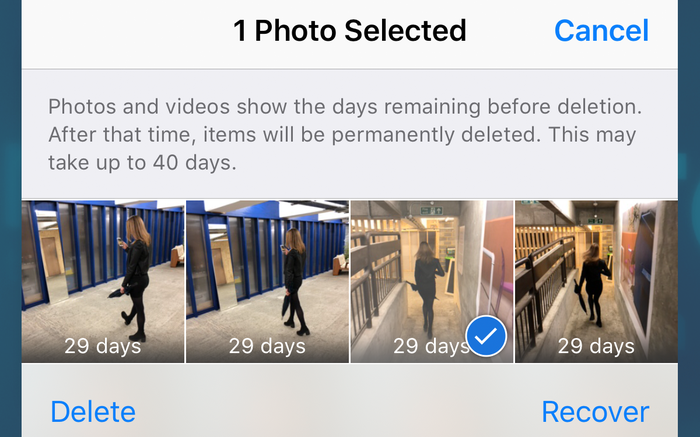
Here's the simplest way to recover your photos and videos after deleting them. When photos are deleted on iOS, they're placed into the Recently Deleted album and shown in the Photos app for around 30 days.
-
Step 1. Open the
Photosapp from your device. -
Step 2. Scroll down to the bottom of the app to find the
Other Albumssection, and select theRecently Deletedfolder. -
Step 3. If your file is here, then congratulations: click on the file, hit
Recoverat the bottom right of the screen and we’re done. If not, read on.
Option 2. How to find deleted photos and videos on your other devices using iCloud Photo Library
You can use this step if you have more than one device on your iCloud account, for example:
- iPhones, iPads, iPod Touch devices
- macOS devices, such as a MacBook, MacBook Pro or iMac
- Windows computers with iTunes and the iCloud component installed and signed in
You will also need to use iCloud Photo Library. If you don’t know whether you're using it, it’s likely that you are, as the setup process on a new iPhone prompts you to enable it. Here's how this method works: if the photos were deleted on an iPad or iPhone without a data connection, or in Airplane mode, the other devices won’t be aware of the deletion. Leave the device without its connection and recover the content from another device on the account.
Alternately, if the photo was deleted on an iPhone with a data connection (as is most likely), but other devices associated with that iCloud account are offline or powered off, they won’t have completed the deletion. For instance, if you delete a photo so that it enters Recently Deleted for 30 days, the content won’t be deleted from that device so long as it stays offline.
If you have a powered off device that may not have had the photo's deletion synchronised to it, you’ll need to turn it on without it going online. Most commonly, an iOS device will go online when you power it on. So how to prevent this?
There are a few tricks to stop an iOS device from going online when powered on. If your device has a SIM card, ensure that it is removed. If your device will connect to a wireless network when powered on, ensure that you are out of range or the access point is powered off. Take these precautions, then power on and check.
Option 3. How to recover deleted photos and videos from iPhone or iPad backup
If the first two approaches haven't worked, don’t worry. If you use Apple’s iTunes software, backups of your device are created when you synchronise it by plugging it in or via Wi-Fi. Both Windows PCs and Macs running macOS 10.14 or earlier can run iTunes. If you're using macOS 10.15 or later, you won't have iTunes, but you can still create backups using Finder.
Follow these steps to recover photos and videos from an iTunes backup:
-
Step 1. Download and install the free version of iPhone Backup Extractor to your PC or Mac. Don’t worry, we’re not trying to hustle you into anything. We love it when people buy our software, but our free edition doesn’t have ads or crappy bundled software with it, and it has everything you need to examine your backups without needing to spend a dime.
-
Step 2. Run iPhone Backup Extractor and select your device under
ITUNES BACKUPSin the left-hand column. You may be prompted for an iTunes backup password at this point. Read our article about Recovering a lost iTunes backup password if you've lost your password.
-
Step 3. Click
Previewnear the top of the screen. Scroll through the files inPhotosto find the photo or video you want to recover. -
Step 4. Once you've found the file (or files, you can recover up to 4 files at a time with our the free edition), click
Extractat the bottom right. ClickContinueon the popup and your files will be extracted.
For privacy reasons, iPhone Backup Extractor will only show backups that have been created by the computer’s currently logged in user. If another user on the PC or Mac may have synchronised iTunes with the iPhone or iPad, ask them to log in and install our software.
Option 4. How to recover deleted photos and videos from iMessages, SMS and WhatsApp messages
Could you have sent or received the files through an app, such as iMessage or WhatsApp? In that case, we may still be able to recover the photo or video for free through the app’s data.
The best way to search for message attachments from iMessage or third-party apps is to use iPhone Backup Extractor. You can use this with your local iTunes backup, or with an iCloud backup (see steps for downloading this in option 5). Here's how to look for the missing file using an iTunes backup.
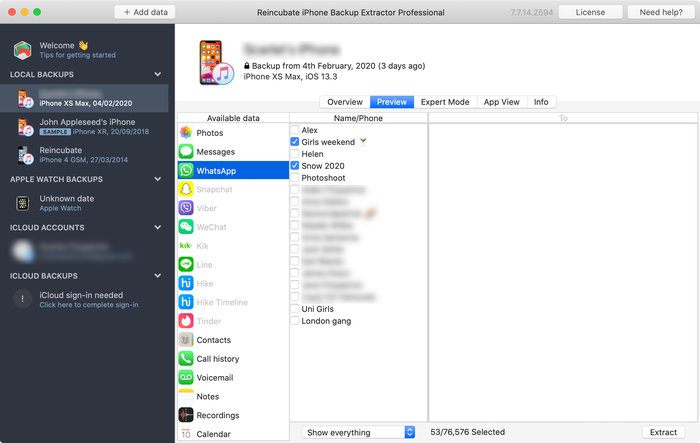
Step 1. After loading iPhone Backup Extractor, select a backup on the left-hand navigation and click
Previewto activate the preview tab.
iPhone Backup Extractor's preview mode -
Step 2. Go through the list of the most popular apps to examine the content they have. If you find the file you're looking for, select and
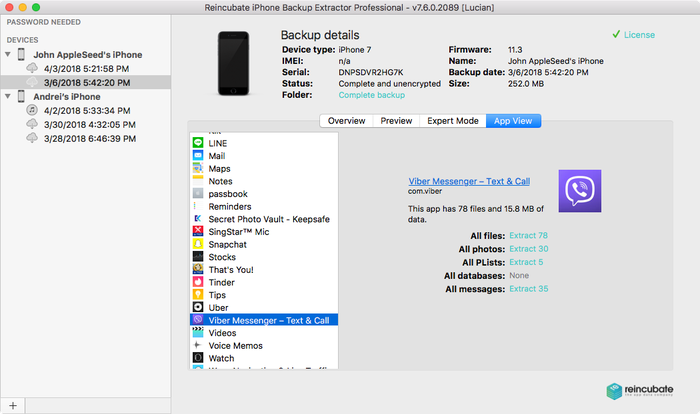
Extract.If the app you're looking for doesn’t feature in the Preview list, you can use App View. This will list every app installed at the time the backup was taken, and provide a way to extract only that app’s backed up files.
Step 3. Click on the
App Viewtab, and then select the app or apps in question, and you’ll be able to extract their data by choosingExtract all.
App data view in iPhone Backup Extractor -
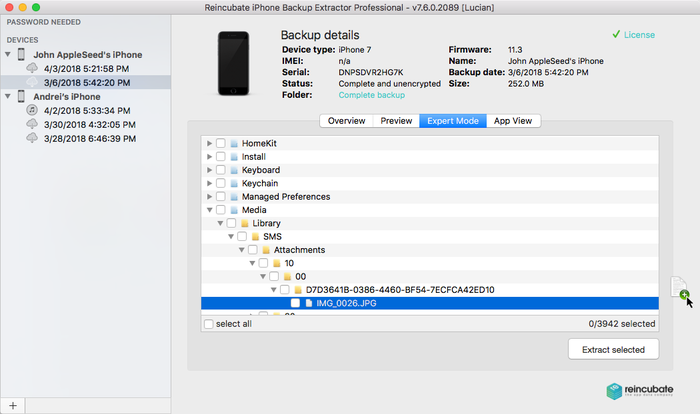
Step 4. If neither
PreviewnorApp Viewlead you to the photos, the last approach is to try Expert Mode. This can be activated by selecting theExpert Modetab. This provides a list of all of the files contained in the backup, divided into folders to represent the structure of the iPhone. Most commonly, apps store their data under theApplicationsandApplication Groupsfolders.
You’ll find that once you’ve browsed your app’s folder in Expert Mode, you’re able to drag the files you want to recover out of iPhone Backup Extractor window and onto your desktop or a folder of your choice.
But what if you don’t have a local iTunes backup available, and no backups are shown? That’s where iCloud comes in...
Option 5. How to recover deleted photos and videos from an iCloud backup
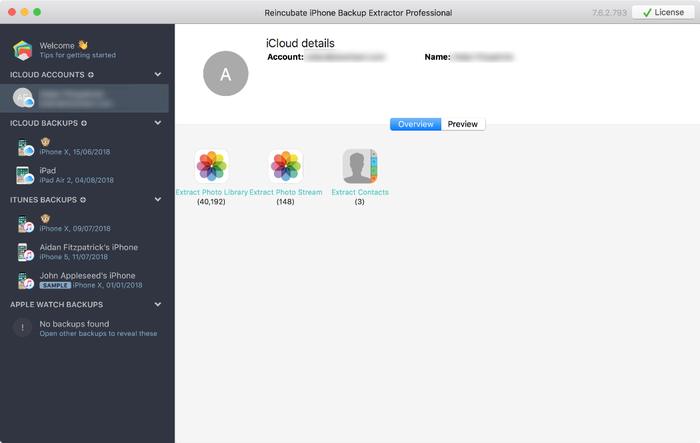
If have iCloud backups you can access that data easily using iPhone Backup Extractor. Here's how to access your iCloud backups through our software:
-
Step 1. In iPhone Backup Extractor, click
Sign in to iCloudat the top of the screen, and enter your iCloud details. -
Step 2. Click on your iCloud account name under
ICLOUD ACCOUNTS. -
Step 3. Click
Previewnear the top of the screen. Scroll through the files inPhotosto find the photo or video you want to recover. -
Step 4. Once you've found the file or files to recover, click
Extractat the bottom right. ClickContinueon the popup and your files will be extracted.
Option 6. How to recover deleted photos and videos by downloading photos from Apple’s Photo Stream or iCloud Photo Library
It's also possible to recover deleted photos from iCloud even if they are not present in iCloud or iTunes backups. To do this, you need to look in Apple’s Photo Stream data for your account, and in the iCloud Photo Library. Photo Stream and Photo Library can contain different photos, so it's important to check both.
Again, you can use iPhone Backup Extractor to download pictures from each source. You'll need to use the paid edition for this.
-
Step 1. Sign into your iCloud account, via the iPhone Backup Extractor.
-
Step 2. Click on your iCloud Account under
ICLOUD ACCOUNTSin the left-hand pane. Step 3. From here, you can select
Photo LibraryandPhoto StreamandDownloadthe files.
About to download from the iCloud Photo Library
Option 7. How to recover deleted photos and videos with forensic recovery of photos by Reincubate’s support team
If the earlier techniques haven’t led you to your file, then all is not yet lost. We don’t share too much detail about the magic we use here, but we have a number of tricks we can harness for you. ?♂️ Reach out to the support team, and let us know what you’ve tried so far.
Reincubate’s iPhone Backup Extractor is built around a piece of technology which we call ricloud API. This lets us do some pretty advanced things which are unique to Reincubate. In some cases, we can use it recover photos from the iCloud Photo Library even after they have been purged from the Photos app after 30 days, or to pull the photo in question from a “partial snapshot” which has older data than your iCloud backup. If your data was stored on an unencrypted disk, it may be that a disk recovery has potential.












by Swetha Buddineni
I did not set password for iTunes ... but it is asking password while restoring...please help
reply by: Reincubate Support
Oh no! Check out our guide on recovering iPhone passwords: it's here.
by Shalini
Hi, My issue is, I have lost some precious photos from my Iphone and unfortunately they are not backed up anywhere. There is no back up at all, no icloud, itunes nothing. And those photos are not even shared on whatsapp or imessage or facebook or anywhere. So, my question is will you be able to retrieve my photos back? I downloaded your free version and tried but it only recovered 4 photos and it says it was able to extract 879 photos. But to get all those i was asked to purchase the license. I have no issues in purchasing the license. But my concern was without knowing whether the photos i am looking for are available in those 879 extracted photos, how can i buy the license. What if after purchase i couldn't get what i am looking for. Because i have lost around 4500 photos. So, i want to know if your Forensic recovery of photos by Reincubate’s support team can help me in any way? I don't want the recovery of all the 4500 photos. I am just interested in some 30-50 photos which are very special for me. Kindly please help me if you can. Thank you
reply by: Reincubate Support
Hi Shalini, are you able to see the photos you want in the preview? If so, then definitely. If not -- drop us a note and we'll dig deeper for you, whether or not you buy a license. ?
by David Breed
I lost all of my photos in my photostream when I was instructed to turn on iCloud photo library. I was helped to reinstall yesterdays backup but that did not have the photostream either. I did not want icloud photo library. I was happy with myphotostream. How can I get ALL of my pictures back
reply by: Reincubate Support
Hi David, oh no, that sucks! iPhone Backup Extractor can help with exactly that: if you point it at your iCloud account, it'll be able to download the photos that were previously shown in My Photo Stream, assuming 30 days haven't passed.
by Lia Ramirez
I want to know how to recover photo stream past 30 days? If i reset my device and restore it with last back up will photo stream be the same as last backup?
Can iPhone Backup Extractor retrieve photo stream stored on last back up even past 30 days?
reply by: Reincubate Support
Hi Lia, thanks for your comment! Photo Stream data is supposed to be discarded from iCloud after 30 days, though in practise we've seen it remain for as many as 90. So yes, iPhone Backup Extractor may be able to help you here. If it doesn't, there's always the money-back promise.
Another approach would be to check over any iPhone backups you have on your PC or Mac. They could help, too. Good luck, and reach out if you need help!
by Amanda Mendez
I'm missing 500+photos from my photos from My Photo Stream how can I get them back?
reply by: Reincubate Support
Hi Amanda, thanks for commenting! We've updated this article to cover recovery of My Photo Stream recovery. Check it out!
by Gabby Garcia
I turned my iCloud off to have more storage available on my phone and I did the iOS 9.3.2 update and it updated just fine but I go to my photos and I see that I only have 30 photos now, before that I had over 850 and now they're gone and I can't seem to get them back. Someone please help me
reply by: Reincubate Support
Hi Gabby, do you have an iPhone backup? That'd be the best bet to look to recover these photos.
by Charlene crowe
Losing photos really sux. Apple should have informed its customers before pulling this shit. I've got ours from New Zealand from last summer tht are freaking missing. Very upset.
by Firdaws
I've lost over a 1000 pictures from my camera roll which were saved on my iCloud, can someone help me get them back. Thanks
reply by: Reincubate Support
Sure thing Firdaws; we've dropped you a note to see if we can help recover these for you. ?
by dave
the free version keeps on restoring the same two photos. How can i choose which photos to extracts or how can i get all of them back with the free version even if its only 2 at a time..???
reply by: Reincubate Support
Hi Dave: if you're exporting in preview or expert mode, the trick is to select ones each time. You can choose up to 4 with the free edition.
by Darren
Wow. I can't believe it I wish I'd know this was around when my phone got stolen and I lost all the data on it last year, funny thing is I can see that backup so I'll see whats on there. This works and it's good well worth the money. Totally recommended
by Matt
Will this work with "sync'd" data (specifically the camera roll photos), or do you have to have performed a manual "back up" for iphone backup extractor to work?
reply by: Reincubate Support
You'll need a backup, as created by iTunes. Reach out if we can help!
by Amazed
ALL I CAN SAY IS WWWOOOOWWWW!! I thought all my stuff was gone after I had to do a full restore on my iphone. WOWOWOWOWOWOWOWOWOWOOWWOWOWOW!!! This is SOOOOO worth it! U GUYS ROCK LIKE A MOUNTAIN!
by card recovery
I have used iPhone Backup Extractor and extract my lost photos from my iPohone. It is a powerful and user friendly software.
by Kevin
Please advise,
Kevin
reply by: Reincubate Support
Kevin: yes, so long as you'd backed up the phone, you should easily be able to recover all of your photos. Try the free version of our software and drop us a note if you have any problems. We'll be happy to help.
by Roland Spence
I used iPhone Backup Extractor and found it very easy to recover photos from my iphone.