How to recover all your data if your iPhone was stolen or lost

How to extract data from your lost or stolen iPhone
Have you ever had your iPhone stolen -- or lost it? It happens more often than you'd think. If you're worried about the valuable data you've just lost, and you're wondering if you can still extract it, we've good news for you: the answer is "yes"!
With the help of iPhone Backup Extractor, you can recover all your data from your iPhone, even when you no longer have access to it. Maybe you're asking yourself what you can save from your stolen or lost iPhone. iPhone Backup Extractor can download and recover all your messages, contacts, call history, images, videos and more.
These are the steps you should follow to make sure that your iPhone data is safe, even if it was stolen or lost, and you have no access to it:
-
Locate the iPhone
-
Extract the data from it using iPhone Backup Extractor
-
Block your lost device
-
Delete the data from your iPhone
How to locate your stolen or lost iPhone
If you've just discovered that your iPhone is lost, act quickly and try to find your device using the next steps:
Navigate to iCloud.com then go to "Find my Phone". Depending on your settings you may see different things: if you see only
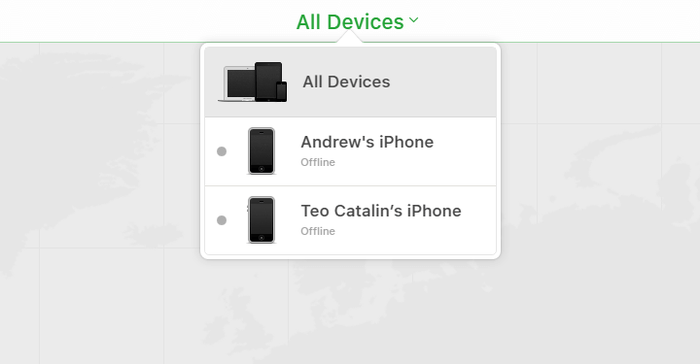
Settings,Keynote,Numbers, andPages, your account is in web only-mode. This tends to mean an iPhone is not associated with your iCloud account. If you need to have full access to your iCloud settings, iCloud needs to be configured on your iPhone. If iCloud isn't active on your iPhone, you can't do anything to recover it. If you're lucky and you're not in this situation, go to the next step.In your iCloud account click on "All Devices". You'll see a list with all your devices associated with that iCloud account. Depending on their settings you'll see two types of devices: offline and online ones. The online devices are marked with a green dot and the offline ones are marked with a grey dot. If the devices marked with offline have been active in the last 24 hours, you'll see the last known location.

"All devices" on Find my iPhone -
Once here, click on the device you need to locate. If you're lucky, and your device is still online, you'll see it on the map. If "Find My iPhone" is unable to locate your device, you are going to see the last known location.
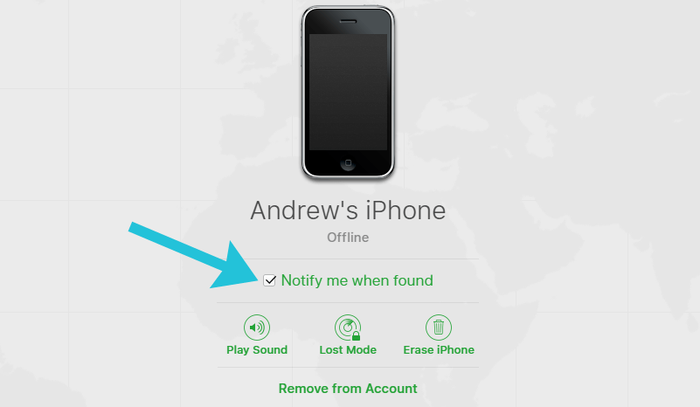
Go to "Notify me when found" and activate it. You'll get an email when the phone will be started or will be online.

Notify me when found in Find my iPhone
How to recover data from your lost or stolen iPhone
If you're unable to recover your lost or stolen iPhone, you can still recover the data from it. As long as you have an iCloud account, or a recent iTunes backup -- and iPhone Backup Extractor -- you'll be able to retrieve your data.
In order to download all your data from your lost or stolen iPhone, follow these steps:
-
Download iPhone Backup Extractor on your computer. Depending on your operating system you need to get the Mac version or the Windows version.
-
Install it on your computer then open it.
-
If you have an iTunes backup on your computer, iPhone Backup Extractor will find it automatically, and you'll see it on your computer's screen. If you don't have an iTunes backup, sign in to iCloud using iPhone Backup Extractor, and you'll be able to access your iCloud backups. You'll need a license for iCloud access.
Once the iTunes or iCloud backup is loaded in iPhone Backup Extractor, you'll be able to recover your data from it. You have multiple options for doing this, depending on the data you need to retrieve:
Go to the "Overview" tab and extract your data by clicking on each category of data. Choose a location and your data will be downloaded on your computer. This method is useful when you want to recover data from the following apps: Photos, Contacts, Calendar, SMS, Recordings, WhatsApp, Videos, Voicemail, Notes, Call History and Location data.

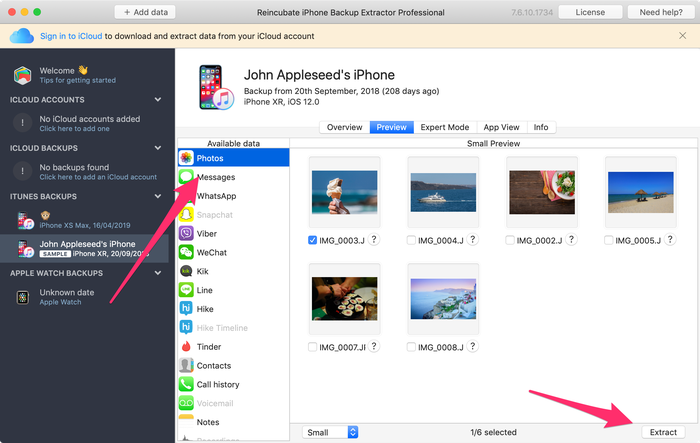
iPhone Backup Extractor's overview mode Go to "Preview" tab and select the apps you want to recover from. You can preview your data before deciding to download it. This method is used to extract data from apps like Photos, SMS, WhatsApp, Snapchat, Viber, Kik, Line and Hike, for example.

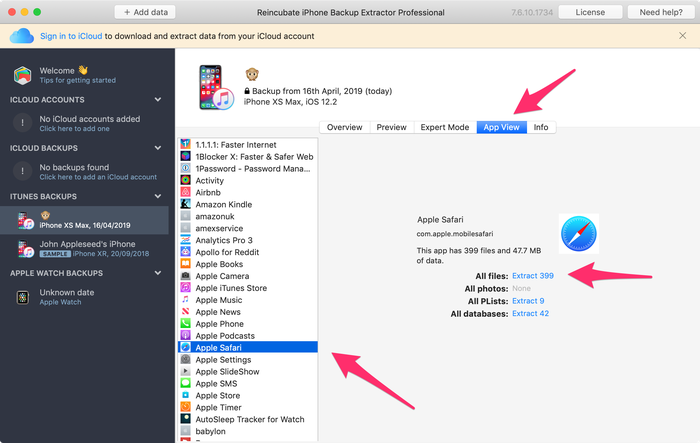
Extracting data from preview mode Go to the "App View" tab and pick the app that you want to recover data from. You'll see a list of files in the right pane, marked with blue letters. Click on them and choose a folder where you want to extract data. The data will be extracted directly on your computer.

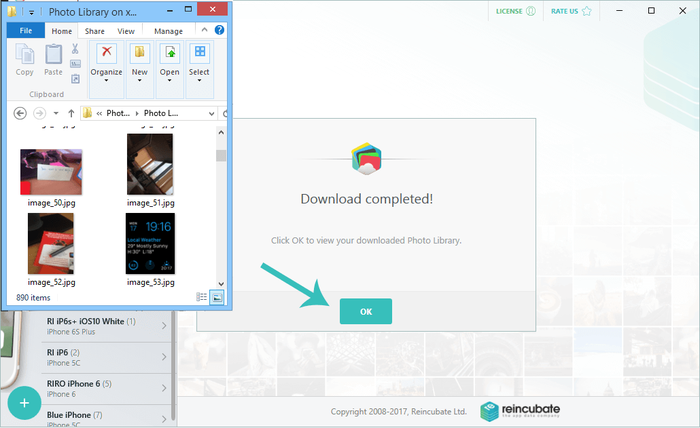
Extracting data from app view mode Go to the "Photo Stream" option (at the top-left of the app) and click on it. On the right side, you will see a "Download" button. Click on it and choose a location. Your Photo Stream files will be downloaded on your computer in a few moments, depending on the size of your data. This method is useful when you want to extract the last images and videos taken with your iPhone. Note that Photo Stream data is deleted after 30 days -- so it's best to be quick!

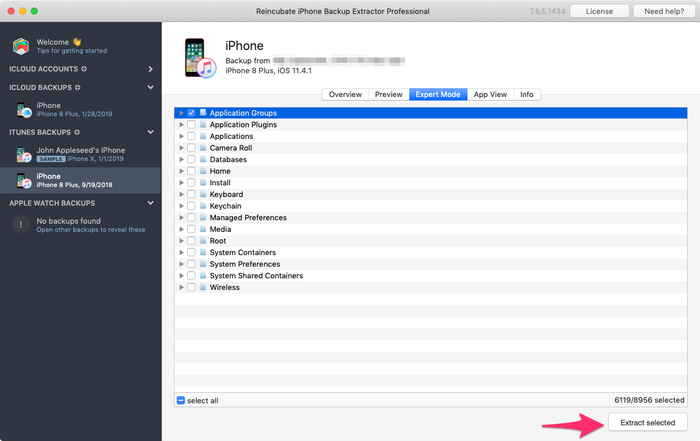
Downloading Photo Stream from a lost iPhone Go to "Expert Mode" and manually choose the files and folders you need. You can download databases or files associated with any of your apps. (You can learn more about these files in this article.

Data extraction in expert mode
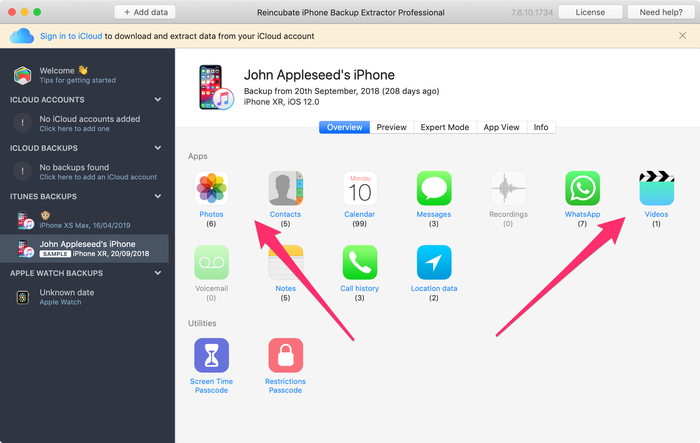
As you can see, you can still extract and recover data from your stolen or lost device using iPhone Backup Extractor. This method can also be used for iPhones, iPads or iPods.
How to block your lost device if "Find my iPhone" is enabled
If your iPhone was lost or stolen, you can still control what happens with it. You have a few options, depending on the settings of your lost device.
If "Find my iPhone" is enabled, you can do the following things:
-
Locate your device (as we described above)
Activate "Lost Mode" on your device, using your iCloud account. This method works for iOS 6 or later. If you have an iPhone with iOS 5, use the "Lock" option instead. If "Lost Mode" is activated, the device will be locked with a four-digit password. You can also display a custom message on your iPhone, and track its location (if it's active).

Activate lost mode
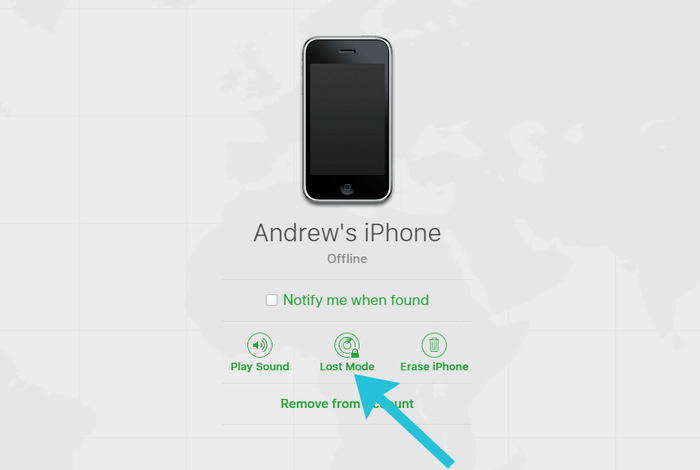
Note that "Lost Mode" will also lock Apple Pay if you have any credit card attached to it, so it's best to activate this mode as soon as it possible. "Lost Mode" can be deactivated if the correct password is entered. "Lost Mode" can be disabled from your iCloud account or the "Find My iPhone" app.
How to lock your device if "Find My iPhone" is not enabled
Did you lose your smartphone but didn't have "Find My iPhone" enabled? If you want to block it, there are a few ways to do it:
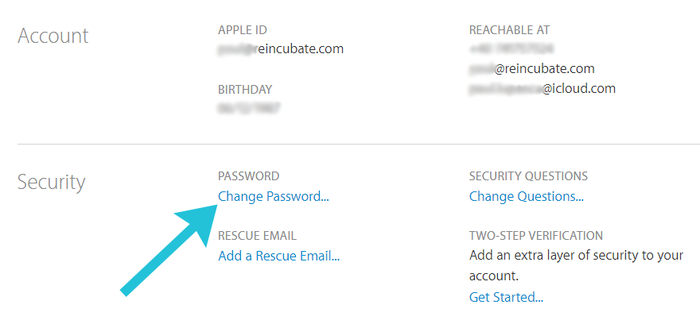
Go to your iCloud account and change your password. Once your Apple ID password has been changed, you can block anyone from accessing your iCloud account. This also prevents access to iTunes and iMessages.

Changing password for your Apple ID -
From iCloud, change the passcodes for all your associated accounts available on your lost or stolen iPhone. We suggest you change your Facebook and Twitter passwords, for example. You should also change any other important password from your lost iPhone.
-
Contact your carrier and report your stolen or lost device. They can block the account and SIM / IMEI associated with that number, or provide you data useful to identify the thief. For example, you may be able to get a list of the phone calls made after you've lost it, and identify the people associated with those phone numbers.
-
Contact the police and give them the serial number and IMEI associated with your stolen or lost iPhone. They may find it if you're lucky. (iPhone Backup Extractor can tell you both the serial number and the IMEI: they're shown under the "Info" tab.)
-
Once the police give you a crime report number, you'll be able to contact your insurance company to report the loss and claim for it, assuming you have insurance.
Note that if the "Find My iPhone" option is not enabled, you can't do anything to track your phone or delete it remotely.
How to remotely delete the data from your iPhone
If you've extracted your data from the iPhone and you're sure that the phone is lost forever, you may want to delete all the data from it as long as the "Find My iPhone" is enabled on your device.
Follow the next steps if you want to erase the data from your lost or stolen iPhone:
-
Go to your iCloud account and access the "Find My iPhone" page.
-
Select "All devices" then pick the device you need to erase.
-
You'll see three options: "Play sound", "Lost Mode" and "Erase iPhone".
-
Click on "Erase iPhone" then enter your Apple ID passcode to confirm your request.

Erase iPhone remotely
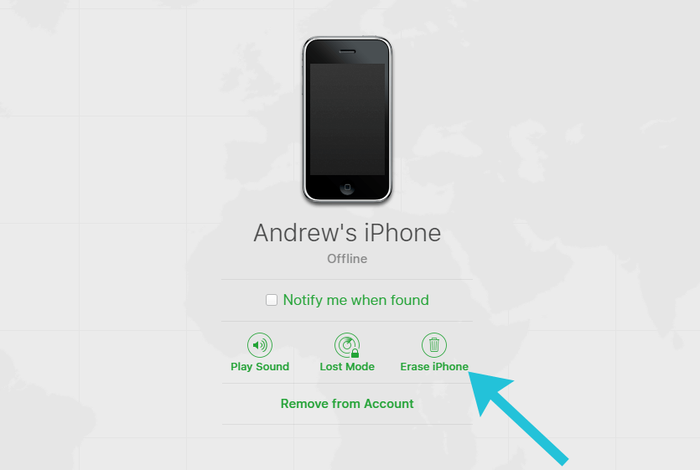
After you follow the steps above, the iPhone will be erased when it's next online. (It'll still be locked to your account, though.) If a thief keeps the iPhone offline, it won't erase itself, however.
If you find your iPhone after deletion, you can still restore the data on it using the iCloud account associated with your phone.
Be aware that if you delete your lost iPhone data, you won't be able to track it anymore. Also, if you remove the iPhone from your iCloud account, it can be used by another person. So, the best option for you is to erase it but keep it associated with your iCloud account. This way, your lost device will become unusable to anyone else.
How to keep your iPhone safe
In case you're asking yourself what you can do to ensure your iPhone doesn't get lost or stolen. We've got a few tips to protect your data and eventually recover your lost or stolen device.
To be sure that your iPhone data is safe, we recommend the following:
- Make regular iCloud backups (& deal with iCloud Backup Failed if you see it!)
- Activate "Find My iPhone" on your device and keep it active
- Create an iCloud account (if you don't have one) and associate your iPhone with that account
- Make iTunes backups and save them on your PC or Mac
- Activate two-factor authentication (2FA) or two-step verification on your iPhone
- Use a long password for your iCloud account
- Activate the restriction passcode on your device
If you follow these rules, your iCloud and iPhone's private data should be safe. Even if your iPhone is lost or stolen, you'll still be able to retrieve the data from it and find its location.
If you need help with the data recovery from a lost or stolen iPhone, our support team are ready to help!



by Elg
If I need to get deleted texts from an iTunes backup that were deleted prior to my backup, is it possible? Would a third party be able to recover?
I wasn’t sure if iTunes backed up the free storage where deleted messages were put until overwritten.
reply by: Reincubate Support
Yes, in some circumstances. Have a look at this guide.
by Guilherme
My iPhone have been stolen, how I confirmed that anybody will be access my documents and photos?
Thank you
reply by: Reincubate Support
Hey Guilherme, thanks for commenting. The two most important things here are that you have a strong passcode set on the device, and that your iCloud password is also safe. If you hadn't set a strong passcode on the phone, there's a real possibility whoever had your phone will have access to your data.
You'll see this article guides you through remotely locking or erasing your device. If you do either your data will be safe, assuming the phone is online.
by nawfees
if the iphone is lost, two Factor Authentication will ask while the icloud sign in.... how to do this problem?
reply by: Reincubate Support
Hi nawfees, Apple will have prompted you to choose a phone number for recovery when you set up 2FA. They've got a page for Apple ID recovery here.
by MOZAMMEL HOSSAIN
i lost my iphone Apple iphone 6s Model A1688 serial no
C77QNCUVGRY5please help meby Kathy
I need to back up my contacts and photos Incase I ever break or lose my phone. Every time I try to send to cloud it asks for my iTunes password. I don't use I tunes and have no idea what my password is. I have an iPhone.
reply by: Reincubate Support
Hi Kathy: try these tips on recover your password.
by Dani
I cannot see my device on the list of devices...How do I solve this?
reply by: Reincubate Support
Hi Dani, if you don't see your phone on the list of devices under
Find My, it suggests the device isn't associated with that iCloud account. Either it's been removed — you'd have got an email from Apple if so — or it's under a different account. Do you have a second iCloud account?